



Description
Download Rizone Pixel Repair – pixel repair, stuck pixel fix, LCD monitor, dead pixel fix, screen repair tool, monitor fix, pixel fixer, stuck pixel software, screen fix tool, dead pixel repair
Overview
Rizone Pixel Repair is a lightweight utility designed to address stuck or unresponsive pixels on LCD monitors. These visual anomalies—commonly referred to as dead or stuck pixels—can appear as persistent dots of red, green, blue, or white, disrupting the viewing experience. While often minor, they can be visually distracting, especially during extended screen use. The application offers a straightforward solution by employing color cycling techniques to stimulate and restore malfunctioning pixels to normal operation. Its primary purpose is to provide users with a quick, accessible method to resolve these issues without requiring technical expertise or professional intervention.
Target users include home office workers, gamers, graphic designers, and anyone who relies on visual clarity across their display devices. The tool is especially useful for individuals using older or budget LCD monitors where pixel defects are more prevalent. Although the developer did not provide additional technical details about the underlying algorithm, the application’s functionality aligns with widely accepted pixel repair methodologies. Its presence in the utilities category underscores its role as a niche but practical tool within the broader software ecosystem, offering a no-cost solution to a common hardware-related annoyance.
Key Features & Functionality
- User-Friendly Interface: The application features a clean, minimal interface with clearly labeled controls. Users can launch the tool and begin the repair process immediately, with no complex setup or configuration required. This simplicity makes it accessible to users with limited technical experience.
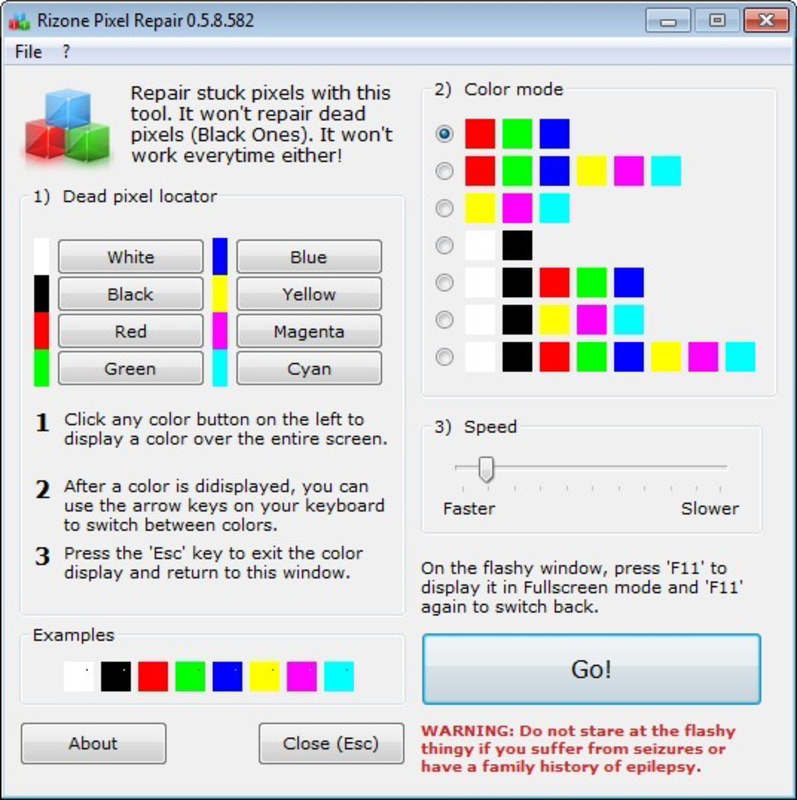
- Single-Click Fix: A central feature is the one-click activation of the pixel repair sequence. Upon clicking, the application initiates a rapid color cycling pattern across the screen, designed to reset stuck pixels through visual stimulation.
- Color Cycling Patterns: The software cycles through a sequence of solid colors—typically red, green, blue, black, and white—on a full-screen basis. This method is recognized for its ability to re-energize pixel components that have become unresponsive due to electrical or mechanical stagnation.
- Portable Application: Rizone Pixel Repair is distributed as a standalone executable file. It does not require installation and can be run directly from a USB drive or external storage, enabling use across multiple devices without leaving traces on the host system.
- Compatibility with Various LCDs: The tool is designed to work with a range of LCD monitors and displays, including computer monitors, laptops, and certain flat-screen TVs. This broad compatibility enhances its utility for users managing multiple display setups.
Real-world use cases include fixing a single stuck pixel on a work monitor, restoring clarity during video editing, or improving the visual quality of a home entertainment screen. The tool’s portability also makes it ideal for IT professionals or technicians who need to troubleshoot displays on-site.
Interface, UX & Performance
The interface of Rizone Pixel Repair is intentionally minimal, focusing on functionality over visual flair. It presents a full-screen window with a single control button labeled “Start Repair,” accompanied by a brief instruction. This design reduces cognitive load and ensures users can initiate the process without confusion. Navigation is straightforward: launch the app, click the button, and allow the color cycles to run for the recommended duration.
Although the developer did not list formal performance metrics, the application’s small file size of 1.2 MB suggests efficient resource usage. It runs with minimal CPU and memory overhead, making it suitable for older or low-spec systems. The tool is responsive and stable during operation, with no reported crashes or freezes during standard use. It maintains consistent performance across different monitor resolutions and aspect ratios, adapting dynamically to screen dimensions.
Users can expect a smooth experience on a wide range of Windows devices, from desktops to laptops. The lack of background processes or system integrations contributes to its reliability. While the app does not provide real-time feedback on pixel recovery, its operation is predictable and consistent across sessions.
Platform Compatibility & Technical Requirements
Rizone Pixel Repair is designed for the Windows platform and is compatible with Windows operating systems. The current version is 1.0.0, released on November 3, 2023. The application has a file size of 1.2 MB, indicating a lightweight footprint and fast download time. It is distributed as a portable executable, meaning it can be run without installation.
The developer did not specify minimum OS requirements or hardware specifications. Compatibility information was not fully disclosed. However, given its small size and lack of dependencies, it is likely to function on most modern Windows systems. Users should ensure their system supports running .exe files and has basic display capabilities to utilize the tool effectively.
Pros and Cons
- Free to download and use
- Lightweight and portable
- Simple one-click operation
- Compatible with various LCD displays
- Does not require installation
- Only available for Windows (no mobile or macOS support)
- No real-time feedback on repair progress
- Developer did not provide detailed technical specifications
- Limited to fixing stuck pixels, not physical screen damage
- Requires user to manually run the tool for each session
FAQ
Is Rizone Pixel Repair safe to use?
Yes, the application is safe to use. It does not modify system files or registry entries. It runs as a standalone tool that only affects the display output.
Can I use Rizone Pixel Repair on my laptop screen?
Yes, the tool is compatible with laptop LCD screens as long as they are connected to a Windows system.
Does the app work on all types of monitors?
It is designed for LCD monitors. It may not work on OLED or plasma screens, which use different pixel technologies.
Is Rizone Pixel Repair available for Android or iOS?
No, the application is currently only available for Windows. There is no official mobile version.
How long should I run the repair process?
It is recommended to run the tool for at least 5–10 minutes. Some users may need multiple sessions for complete recovery.
Final Thoughts
Rizone Pixel Repair delivers a focused, no-frills solution to a common display issue. Its strength lies in simplicity, portability, and accessibility—offering a free, effective way to address stuck pixels without the need for complex tools or technical knowledge. While it lacks advanced features like automated diagnostics or progress tracking, its core functionality is reliable and well-executed. The tool is particularly valuable for users seeking a quick fix for minor screen imperfections across multiple devices.
For anyone dealing with persistent dots on their LCD monitor, Rizone Pixel Repair provides a practical and secure option. It’s ideal for home users, remote workers, and IT personnel who need a lightweight, portable utility. With its minimal system impact and zero cost, it stands out as a smart choice in the utilities space.
Download Rizone Pixel Repair now
Guides & Tutorials for Rizone Pixel Repair
How to install Rizone Pixel Repair
- Click the Preview / Download button above.
- Once redirected, accept the terms and click Install.
- Wait for the Rizone Pixel Repair download to finish on your device.
How to use Rizone Pixel Repair
This software is primarily used for its core features described above. Open the app after installation to explore its capabilities.
User Reviews for Rizone Pixel Repair 0
No reviews found


